
The Bifferboard described yesterday is a bundle of fun (well, for geeks like me anyway…).
But this weblog is about physical computing, not just embedded hardware or software.
So let’s hook up a JeeLink!
The first hurdle is a silly one: my Bifferboard only has a single USB slot, and it needs the USB stick to run off. So for this experiment I added an unpowered USB hub:
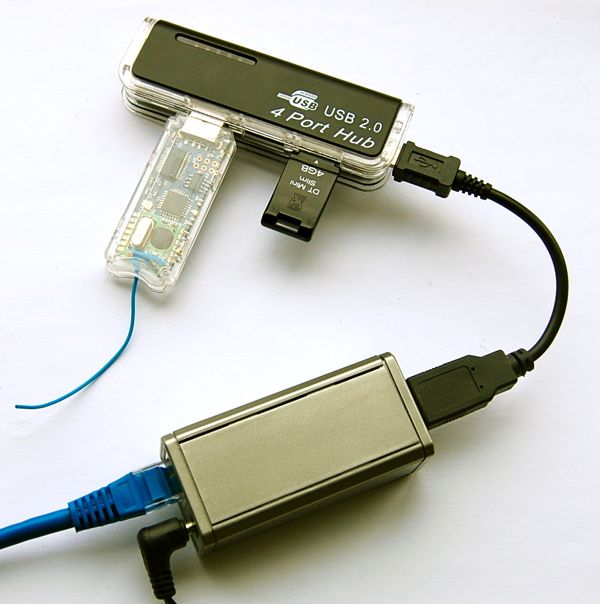
Did I mention that this is a standard Debian setup? Here’s the kernel log with the JeeLink plugged in:
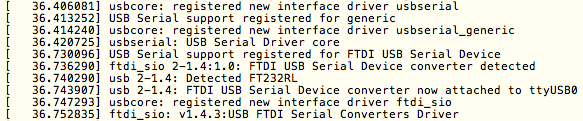
Note how it recognizes the FTDI serial link without having to install or configure anything. Perfect!
The other factoid which can be gleaned from this info is that it took about 36 seconds from the start of the kernel boot to this stage. From this, I’d estimate a Bifferboard with JeeMon to boot up in well under 60 seconds.
To verify that the USB recognition is really complete, I used this little test in “try/application.tcl”:

And sure enough, it recognizes and identifies the USB device:

Let’s try one more thing – by changing try/application.tcl to this code:

Sample output:
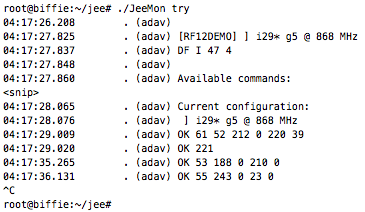
That’s a Bifferboard receiving JeeNode packets via a JeeLink – yippie!
I can now go back to developing JeeMon further on my desktop machine, in the knowledge that software updates are one little restart away (due to JeeMon’s built-in self-updating over internet) and that apps will probably work as is on a Bifferboard. Long live platform independence!
That’s a very nice Bifferboard, where did you get the housing (case) from? DIY? Best regards.
http://bifferos.bizhat.com/buy/