
Whoops – I messed up with several packages I’ve sent out to people. Ouch.
The gory details are in the discussion forum, but here’s the short version:
- I’m shipping ATmega’s pre-programmed with the Arduino bootstrap and the RF12demo sketch. Mighty convenient, since it can get you going a lot quicker.
- And to simplify my work I, ehm… sort of tried to automate it a bit.
- So I burn the bootloader with the Arduino IDE and the burn the RF12demo sketch using “avrdude” from the command line.
- Cool. Except that the second step undid the work of the first step… doh!
- So I ended with ATmega328’s which have the RF12demo but no bootstrap loader.
It turns out that avrdude erases a chip by default when re-programming it. So the bootloader, which is loaded in high-mem, got cleared when storing the demo in low-mem. And of course that doesn’t show in a quick test: the demo on the chip, which I always check, works just fine. Which is why I sent out a few bad JeeNode kits and JeeLinks.
All it took to fix this was one lousy little “-D” command option for avrdude!
So now I’ve decided to automate all the way, and burn the fuses, the bootloader, and the demo sketch all in one go – from the command line.
Here’s what it takes – I have these files in one directory:

The hex files were copied from the Arduino “bootstrap” area and the RF12demo “applet” build area, respectively.
The makefile contains these commands:
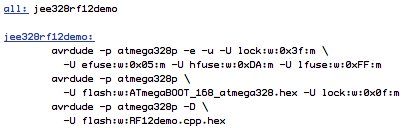
So all I need to do now is to plug in the ISP programmer and put a fresh ATmega chip in its socket, then type “make”. This works for both the JeeNode and the JeeLink chips.
Easy… once done right!