


Hey, there's a radio in there! Dec 2016
The Forth driver for the RFM69 on the JeeNode Zero is in
flib/spi/rf69.fs.
It is normally included in core.fs and therefore always available from flash
memory. It’s very simple to use: call rf-init to intitialise the RFM69
module, and then call either rf-recv to poll for new incoming packets or
rf-send to send out a single packet. The current driver does not use any
interrupt pins, so only the RFM69’s 4 SPI pins plus power need to be hooked up.
Here’s an example of how to receive one packet, followed by a dump to show the payload data:
rf-init  ok.
rf-recv . 9  ok.
rf.buf hex. 20001E94  ok.
rf.buf 9 dump
20001E90   01 00 00 00 C0 01 81 80   06 8F 7A F1 80 7A 7A 7A   ........ ..z..zzz
20001EA0   7A 7A 7A 7A 7A 7A 7A 7A   7A 7A 7A 7A 7A 7A 7A 7A   zzzzzzzz zzzzzzzz
 ok.
This is not very useful, other than to illustrate that the driver works. Here
is a better example based on rf-listen - it configures a different frequency
(868.600 MHz) and net group to listen to, and then dumps each incoming packet in hex format,
including reception details:
8686 rf.freq !  ok.
6 rf.group !  ok.
rf-listen
RF69 21EE06C00102BEC0010A 8101D119CC029A7AE980
RF69 21EE06A202006EC00107 818002A07AEA80
RF69 21EE06C3010108C00107 8101CF19CE8080
The format of these reported packets is as follows:
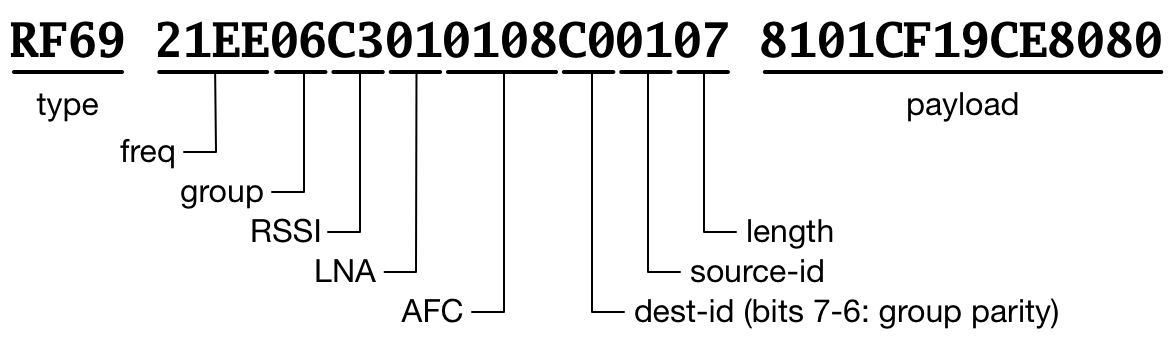
This is the public API of the RF69 driver:
   0 variable rf.rssi
   0 variable rf.lna
   0 variable rf.afc
  66 buffer:  rf.buf

8683 variable rf.freq
  42 variable rf.group
  61 variable rf.nodeid

: rf-init ( -- )  \ init RFM69 with current rf.group and rf.freq values
: rf-recv ( -- b )  \ check whether a packet has been received, return #bytes
: rf-send ( addr count hdr -- )  \ send out one packet
: rf-power ( n -- )  \ change TX power level (0..31)
: rf-sleep ( -- )  \ put radio module to sleep
: rf-listen ( -- )  \ init RFM69 and report incoming packets until key press
: rf-txtest ( n -- )  \ send out a test packet with the number as ASCII chars
: rf. ( -- )  \ print out all the RF69 registers
The rf-listen word is a wrapper around rf-recv to format the above
packet messages:
: rf-listen ( -- )
  rf-init cr
  begin
    rf-recv ?dup if
      ." RF69 " rf-info
      dup 0 do
        rf.buf i + c@ h.2
        i 1 = if 2- h.2 space then
      loop  cr
    then
  key? until ;
Likewise, rf-txtest is a small wrapper to generated a test message, the
payload is an integer, converted to ASCII text:
: rf-txtest ( n -- ) rf-init 16 rf-power 0 <# #s #> 0 rf-send ;We can enter this on a second node to send out one test packet:
12345 rf-txtestThe result will then be reported as follows by that first listening node:
RF69 21EE0650060016C03D05 3132333435For debugging, there’s rf. (note the trailing dot), which
dumps all RFM69 register settings:
rf.
     0  1  2  3  4  5  6  7  8  9  A  B  C  D  E  F
00: -- 10 00 02 8A 05 C3 D9 26 40 41 60 02 92 F5 20
10: 24 9F 09 1A 40 B0 7B 9B 08 42 42 40 80 06 5C 00
20: 00 FC 8D 00 A2 00 07 D9 46 C4 00 00 00 05 88 2D
30: 06 00 00 00 00 00 00 D0 42 00 00 00 8F 12 00 00
40: 00 00 00 00 00 00 00 00 00 00 00 00 00 00 01 00
50: 14 05 88 08 00 00 01 00 1B 09 55 80 70 33 CA 08 ok.
And if you want to experiment with different register settings, there’s nothing simpler than entering some interactive commands to change or read out the RFM69 on the fly:
%1000 $4E rf!  ok.
$4F rf@ . 142  ok.
This starts a temperature measurement by setting bit 3 of register $4E, and then reads out the result from register $4F. This needs to be calibrated before it can be turned into a temperature value, but at least it shows how you can dynamically set a register and read out another one.